FusionCalc Pro | Memo & Calc1.9.9 - App Store

Please wait ... The app listing is being verified for availability.
You'll be able to see results in few seconds.


Publisher Description

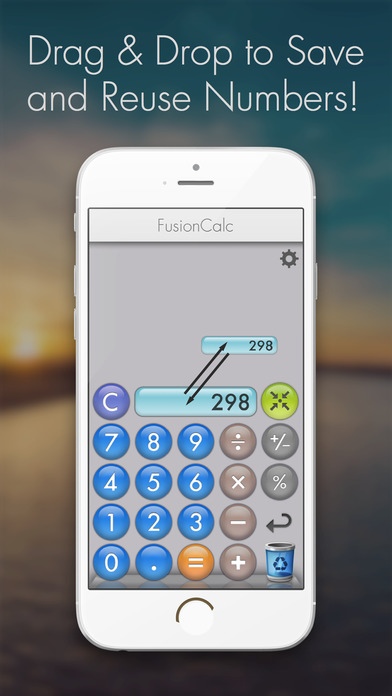
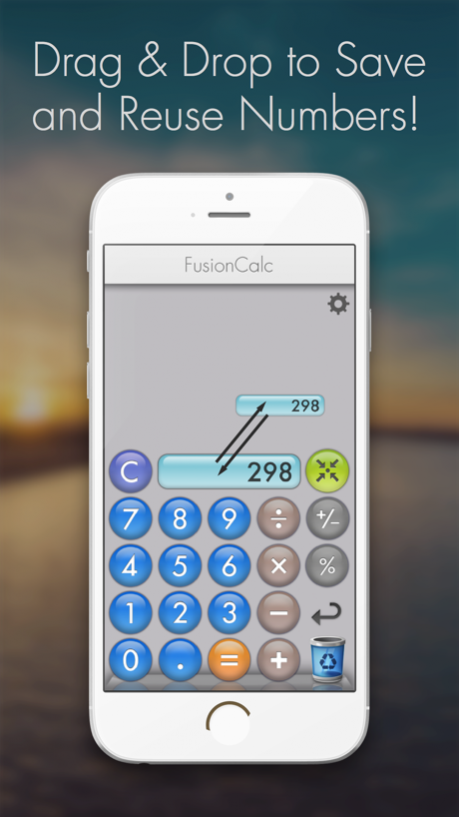
. Drag and drop a number like post-it sticky notes to save it as a memo. Then reuse any number memo in your calculations.
Looking for a fast, easy, basic calculator with intuitive memory function? You can use this calc app to manage shopping lists, expenses, calories, and more!
Meet FusionCalc, the sticky notes memo calculator. Drag a number from the calculator to save it as a memo. Then, reuse it at any time in your future calculations.

See why our handy calculator has been acclaimed as one of the fastest and most innovative calculator apps.

■ BASIC CALCULATOR
Designed to save, drag, and reuse your numbers, our notes list calculator is perfect for busy professionals, pet parents, moms, and anyone who needs quick, efficient math!

Here are the types of calculations you can do:
. basic operations (addition, subtraction, multiplication, and division)
. percentage
. Tap twice to write memo on your number (Makes it easy for you to remember what the number was for).

OFFLINE & DARK-MODE CALCULATIONS
Make use of the eye-friendly dark mode when you do calculations at night. Also, don’t worry about having internet access since you can use the FusionCalc calculator offline.

■ A HANDY, VERSATILE CALCULATOR
◉ Great for Work & Business - Perfect for finance, invoices, sales, taxes, and budgets.
◉ For Moms & Parents - Grocery lists, school expenses, household budgets-made easy.
◉ For Pet Owners - Track pet care expenses, vet visits, pet food, and feeding schedules by using ◉ FusionCalc as your pet calculator.
◉ For Freelancers & Entrepreneurs: Track earnings, costs, and client invoices on the go.
◉ For Students & Teachers: Save equations and complex calculations for later reference.
◉ For anyone: stay organized - save calculations as sticky notes for later use.

■ FUSIONCALC APP FEATURES:
. basic calculator
. save numbers as memos for fast calculations
. drag and drop number notes to use them in your calculations
. calc sound (can be turned off)
. dark mode
. works offline
. ad-free version

Why settle for an ordinary calculator when you can have one that works smarter and faster?
With FusionCalc you get the function and simplicity, but you can also save, drag, and reuse numbers effortlessly and manage lists with automatic sum calculations.

► Try FusionCalc for iPhone & iPad for FREE!
___________

FusionCalc FAQ:
∆ How is FusionCalc different from other calculators with history save?
FusionCalc is more than just a basic calculator offline app-it lets you save, drag, and reuse numbers instantly without needing to re-enter them. Perfect for multitaskers!

∆ Can I use FusionCalc for business calculations?
Yes! Our amount calculator is great for small business owners, freelancers, and accountants who need to track expenses, invoices, and budgets.

∆ Does FusionCalc work offline?
Yes! You can use all memory calculator features without an internet connection-great for travel, remote work, and on-the-go calculations.

∆ Is FusionCalc a free calculator?
Yes! You can use all core features of our number note list calculator for free, with an optional upgrade for an ad-free experience.

Version History Introducing "GenieNote" - A New app that takes FusionCalc to a new level. Just tap on the "Pencil" button at the top of the screen! 1.9.9 07/16/2025 · Fixed Layout issues when using Zoomed Display. 1.9.8 04/04/2025 NEW - White Buttons 1.9.7 06/22/2024 - Optimized for larger-screen iPhones.
- Design remake
- New Dark Mode
- Double Tap to write memo.
- Hold down any number to Copy/Paste. 1.9.6 06/10/2024 Added 4 new click sounds!

Don't forget to check out FusionCalc2 !!! 1.9.5 02/11/2016 *New sound
*Turn sound on & off from the settings menu.

NEW:
FusionCalc2 is now available on the App Store! 1.9.3 10/30/2013 New click sound. Sound can be turned on & off from the Settings App. 1.9.1 08/29/2013 Optimized for iPhone5 and the 4-inch screen iPod Touch! 1.9 10/26/2012 Release note: FusionCalc+ is now available! 1.8 01/09/2012 Full multi-task compatibility & bug fixes. 1.7.1 11/20/2010 * CE Button added.
* Duplicate numbers by dragging out the "entry field" after pressing (+) or (x) button.
* You no longer need to press (=) button in the end of calculation. Calculation will be completed just by tapping of dragging on the entry field. 1.7 10/28/2010 Minor bug fix.
Displays Retina icon properly. 1.6.1 08/27/2010 *Added (+/-) button.
*Added (%) button.
*Added button click sound.

You can turn on/off the click sound from the "Settings" App. 1.6 08/19/2010 *Now saves all locations of outputs, even after the application goes is dismissed.
*Supports iPhone 4 Retina Display! 1.5 07/22/2010 1.0 05/28/2010


About FusionCalc Pro | Memo & Calc

FusionCalc Pro | Memo & Calc is a paid app for iOS published in the Other list of apps, part of Network & Internet.

The company that develops FusionCalc Pro | Memo & Calc is Leo Rivas-Micoud. The latest version released by its developer is 1.9.9.

To install FusionCalc Pro | Memo & Calc on your iOS device, just click the green Continue To App button above to start the installation process. The app is listed on our website since 2026-10-14 and was downloaded 0 times. We have already checked if the download link is safe, however for your own protection we recommend that you scan the downloaded app with your antivirus. Your antivirus may detect the FusionCalc Pro | Memo & Calc as malware if the download link is broken.

How to install FusionCalc Pro | Memo & Calc on your iOS device:

  • Click on the Continue To App button on our website. This will redirect you to the App Store.
  • Once the FusionCalc Pro | Memo & Calc is shown in the iTunes listing of your iOS device, you can start its download and installation. Tap on the GET button to the right of the app to start downloading it.
  • If you are not logged-in the iOS appstore app, you'll be prompted for your your Apple ID and/or password.
  • After FusionCalc Pro | Memo & Calc is downloaded, you'll see an INSTALL button to the right. Tap on it to start the actual installation of the iOS app.
  • Once installation is finished you can tap on the OPEN button to start it. Its icon will also be added to your device home screen.

Program Details


General

Publisher
Released Date
2026-10-14
Languages
English

Category

Category
Subcategory

System requirements

Operating systems
iOS

Download information

File size
14 bytes
Total downloads
0

Pricing

License model
Paid
Price

Version History


Here you can find the changelog of FusionCalc Pro | Memo & Calc since it was posted on our website on 2016-09-27. The latest version is 1.9.9 and it was updated on Apps112 on 17 October, 2026. See below the changes in each version:

version 1.9.9

posted on 2026-10-14

Version History Introducing "GenieNote" - A New app that takes FusionCalc to a new level. Just tap on the "Pencil" button at the top of the screen! 1.9.9 07/16/2025 · Fixed Layout issues when using Zoomed Display. 1.9.8 04/04/2025 NEW - White Buttons 1.9.7 06/22/2024 - Optimized for larger-screen iPhones.
- Design remake
- New Dark Mode
- Double Tap to write memo.
- Hold down any number to Copy/Paste. 1.9.6 06/10/2024 Added 4 new click sounds!

Don't forget to check out FusionCalc2 !!! 1.9.5 02/11/2016 *New sound
*Turn sound on & off from the settings menu.

NEW:
FusionCalc2 is now available on the App Store! 1.9.3 10/30/2013 New click sound. Sound can be turned on & off from the Settings App. 1.9.1 08/29/2013 Optimized for iPhone5 and the 4-inch screen iPod Touch! 1.9 10/26/2012 Release note: FusionCalc+ is now available! 1.8 01/09/2012 Full multi-task compatibility & bug fixes. 1.7.1 11/20/2010 * CE Button added.
* Duplicate numbers by dragging out the "entry field" after pressing (+) or (x) button.
* You no longer need to press (=) button in the end of calculation. Calculation will be completed just by tapping of dragging on the entry field. 1.7 10/28/2010 Minor bug fix.
Displays Retina icon properly. 1.6.1 08/27/2010 *Added (+/-) button.
*Added (%) button.
*Added button click sound.

You can turn on/off the click sound from the "Settings" App. 1.6 08/19/2010 *Now saves all locations of outputs, even after the application goes is dismissed.
*Supports iPhone 4 Retina Display! 1.5 07/22/2010 1.0 05/28/2010

version 1.9.9

posted on 2026-09-04

Version History Introducing "GenieNote" - A New app that takes FusionCalc to a new level. Just tap on the "Pencil" button at the top of the screen! 1.9.9 07/16/2025 · Fixed Layout issues when using Zoomed Display. 1.9.8 04/04/2025 NEW - White Buttons 1.9.7 06/22/2024 - Optimized for larger-screen iPhones.
- Design remake
- New Dark Mode
- Double Tap to write memo.
- Hold down any number to Copy/Paste. 1.9.6 06/10/2024 This app has been updated by Apple to prepare for watchOS 27 compatibility. No new features are included.

Added 4 new click sounds!

Don't forget to check out FusionCalc2 !!! 1.9.5 02/11/2016 *New sound
*Turn sound on & off from the settings menu.

NEW:
FusionCalc2 is now available on the App Store! 1.9.3 10/30/2013 New click sound. Sound can be turned on & off from the Settings App. 1.9.1 08/29/2013 Optimized for iPhone5 and the 4-inch screen iPod Touch! 1.9 10/26/2012 Release note: FusionCalc+ is now available! 1.8 01/09/2012 Full multi-task compatibility & bug fixes. 1.7.1 11/20/2010 * CE Button added.
* Duplicate numbers by dragging out the "entry field" after pressing (+) or (x) button.
* You no longer need to press (=) button in the end of calculation. Calculation will be completed just by tapping of dragging on the entry field. 1.7 10/28/2010 Minor bug fix.
Displays Retina icon properly. 1.6.1 08/27/2010 *Added (+/-) button.
*Added (%) button.
*Added button click sound.

You can turn on/off the click sound from the "Settings" App. 1.6 08/19/2010 *Now saves all locations of outputs, even after the application goes is dismissed.
*Supports iPhone 4 Retina Display! 1.5 07/22/2010 1.0 05/28/2010

version 1.9.9

posted on 2026-08-23

Version History Introducing "GenieNote" - A New app that takes FusionCalc to a new level. Just tap on the "Pencil" button at the top of the screen! 1.9.9 07/16/2025 · Fixed Layout issues when using Zoomed Display. 1.9.8 04/04/2025 NEW - White Buttons 1.9.7 06/22/2024 - Optimized for larger-screen iPhones.
- Design remake
- New Dark Mode
- Double Tap to write memo.
- Hold down any number to Copy/Paste. 1.9.6 06/10/2024 This update from Apple will improve the functionality of this app. No new features are included.

Added 4 new click sounds!

Don't forget to check out FusionCalc2 !!! 1.9.5 02/11/2016 *New sound
*Turn sound on & off from the settings menu.

NEW:
FusionCalc2 is now available on the App Store! 1.9.3 10/30/2013 New click sound. Sound can be turned on & off from the Settings App. 1.9.1 08/29/2013 Optimized for iPhone5 and the 4-inch screen iPod Touch! 1.9 10/26/2012 Release note: FusionCalc+ is now available! 1.8 01/09/2012 Full multi-task compatibility & bug fixes. 1.7.1 11/20/2010 * CE Button added.
* Duplicate numbers by dragging out the "entry field" after pressing (+) or (x) button.
* You no longer need to press (=) button in the end of calculation. Calculation will be completed just by tapping of dragging on the entry field. 1.7 10/28/2010 Minor bug fix.
Displays Retina icon properly. 1.6.1 08/27/2010 *Added (+/-) button.
*Added (%) button.
*Added button click sound.

You can turn on/off the click sound from the "Settings" App. 1.6 08/19/2010 *Now saves all locations of outputs, even after the application goes is dismissed.
*Supports iPhone 4 Retina Display! 1.5 07/22/2010 1.0 05/28/2010

version 1.9.9

posted on 2025-07-16

Introducing "GenieNote" - A New app that takes FusionCalc to a new level. Just tap on the "Pencil" button at the top of the screen!

version 1.9.9

posted on 2025-07-16

Jul 16, 2025
Version 1.9.9
Introducing "GenieNote" - A New app that takes FusionCalc to a new level. Just tap on the "Pencil" button at the top of the screen!

version 1.9.8

posted on 2025-04-04

Apr 4, 2025
Version 1.9.8
· Fixed Layout issues when using Zoomed Display.

version 1.9.5

posted on 2016-02-11

Feb 11, 2016 Version 1.9.5
This app has been updated by Apple to display the Apple Watch app icon.

Added 4 new click sounds!

Don't forget to check out FusionCalc2 !!!

version 1.9.5

posted on 2016-02-11

Feb 11, 2016 Version 1.9.5
Added 4 new click sounds!

Don't forget to check out FusionCalc2 !!!

version 1.9.5

posted on 2016-02-11

Feb 11, 2016 Version 1.9.5
This app has been updated by Apple to use the latest Apple signing certificate.

Added 4 new click sounds!

Don't forget to check out FusionCalc2 !!!

version 1.9.5

posted on 2010-05-28

Disclaimer


Official App Store Link


We do not host FusionCalc Pro | Memo & Calc on our servers. We did not scan it for viruses, adware, spyware or other type of malware. This app is hosted by Apple and passed their terms and conditions to be listed there. We recommend caution when installing it.

The App Store link for FusionCalc Pro | Memo & Calc is provided to you by apps112.com without any warranties, representations or guarantees of any kind, so access it at your own risk.

If you have questions regarding this particular app contact the publisher directly. For questions about the functionalities of apps112.com contact us.



Click stars to rate this APP!

Users Rating:
  0.0/5     0
Downloads: 0
Updated At: 2026-10-17
Publisher: Leo Rivas-Micoud
Operating System: iOS
License Type: Paid

TOP DOWNLOADS
in Network & Internet last week